

Electronic Safety on Cruises: Avoid Phone, Wi-Fi and Internet Scams
Smartphones have become essential cruise-travel tools. Passengers use them for boarding documents, ship applications, maps, excursion reservations, banking, photographs, translation, transportation and emergency communication.
That convenience also creates risk. A fraudulent Wi-Fi network, deceptive text message, stolen phone or fake QR code can expose passwords, financial information and personal data. Cruise travelers should prepare for electronic risks just as carefully as they prepare for weather, health requirements and port security.
Why cruise travelers face special electronic risks
Cruise vacations move passengers through several different digital environments: home and airport networks, cruise-terminal Wi-Fi, shipboard internet, maritime cellular service, restaurants and attractions in port, foreign cellular networks, and transportation and excursion applications.
Each transition may introduce unfamiliar networks, messages, payment systems and websites. The U.S. Department of State warns that mobile devices can be compromised, stolen or damaged while traveling and advises travelers to update their devices, use secure connections and exercise caution with public Wi-Fi.
The safest approach is to assume that any shared network — including those in terminals, cafés, hotels and ports — is public unless its identity and security have been confirmed.
Protect your devices before leaving home
Electronic safety should begin before embarkation.
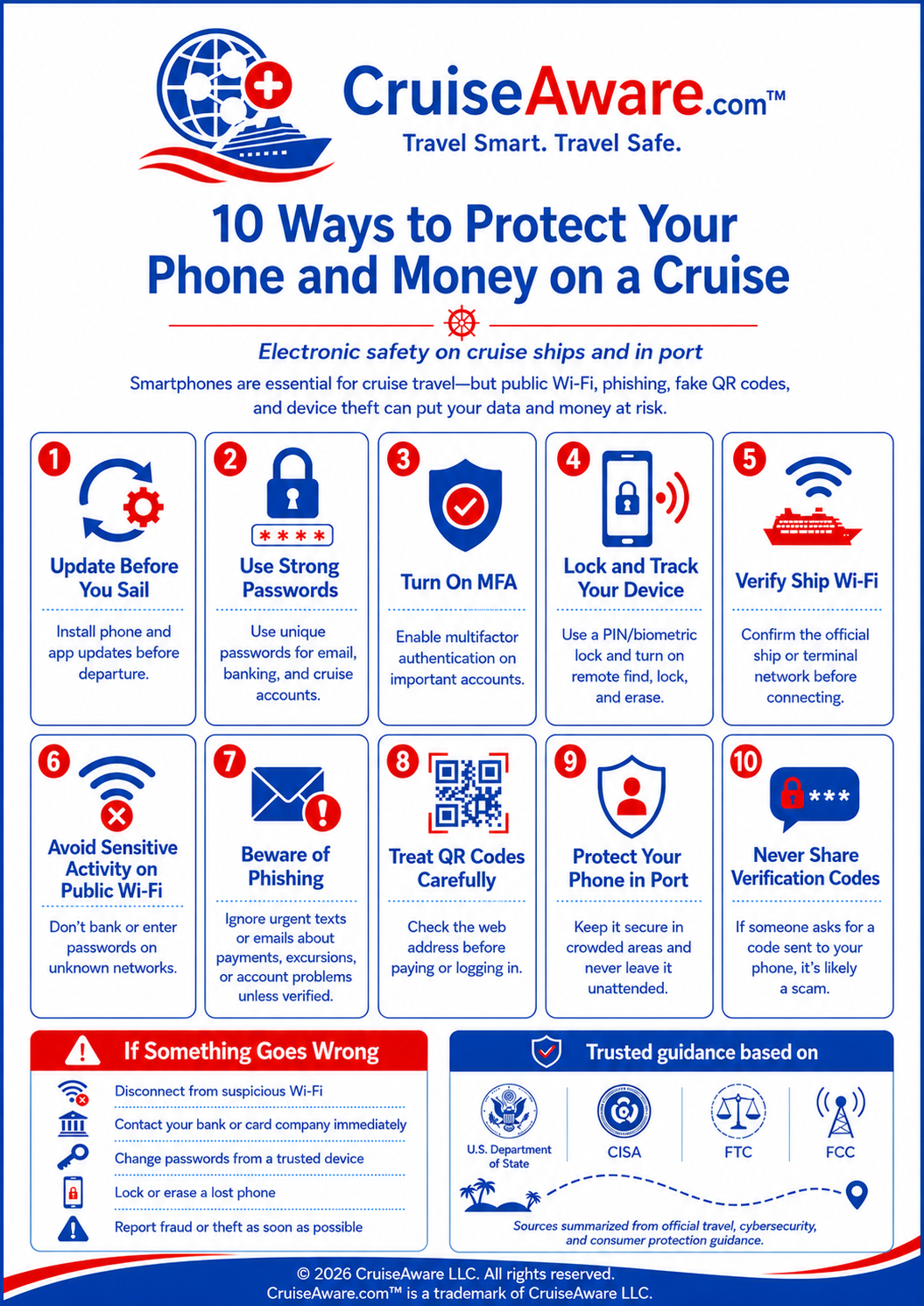
- Update your phone and applications. Install current operating-system and application updates before traveling. Updates often correct known security weaknesses.
- Use strong, unique passwords. Do not reuse the same password for your email, cruise-line account, banking apps and social-media accounts. A password manager can create and store strong, unique passwords. Your primary email account deserves particular protection because it may be used to reset passwords for many other services.
- Enable multifactor authentication (MFA). Require an additional form of verification beyond a password on email, banking, cloud-storage and social-media accounts. An authentication app or security key may provide stronger protection than text-message codes.
- Activate device security features. Use a strong PIN, fingerprint or facial-recognition lock. Enable automatic screen locking and the device's remote location, locking and erasure features. Back up important photos, contacts and documents before traveling.
Use shipboard Wi-Fi carefully
Cruise-line applications and onboard internet packages are convenient, but passengers should still follow normal public-network precautions.
- Confirm the correct network. Ask the cruise line for the exact name of its official Wi-Fi network. Criminals can create similarly named hotspots. Disable automatic Wi-Fi connections so your phone doesn't join an unknown network without your knowledge.
- Limit sensitive activity. Avoid accessing banking, investment or medical accounts through an unfamiliar network. When possible, postpone those transactions until you have a trusted connection.
- Turn off unused connections. Disable Bluetooth, nearby sharing and similar wireless features when they are not needed. Leaving these services active can expose your device to unwanted connection attempts.
- Charge safely. Carry your own charging cable, electrical adapter and portable battery. Avoid connecting a phone directly to a public computer or charging station you do not control — a USB connection can potentially allow another system to interact with the device.
Watch for cruise-related phishing messages
A phishing message attempts to create fear, urgency, curiosity or excitement so that the recipient will click a link, disclose information or send money. Cruise travelers should be suspicious of unexpected messages claiming:
- Your cruise payment failed or your reservation was cancelled
- You must pay an immediate customs or immigration fee
- Your onboard account has been suspended
- You have won a complimentary excursion or upgrade
- A family member has an emergency
- The cruise line needs your password or verification code
- Your bank detected a suspicious international purchase
Do not use the telephone number or link supplied in a suspicious message. Open the cruise line's official application, type its known website address yourself or call a number from your original booking documents.
Treat QR codes as links — not proof of legitimacy
QR codes are now common on menus, attraction signs, parking meters and excursion advertisements. However, a QR code can direct a traveler to a fraudulent website that resembles a legitimate payment or login page. Scammers may also place a fraudulent QR-code sticker over a genuine code.
Before opening a scanned address: examine the displayed website address, look for misspellings or an unfamiliar domain, and avoid entering passwords or payment information unless the site has been independently verified. Use the company's official app or manually entered website when available.
The FTC warns that malicious QR codes can lead to imitation websites designed to steal login or payment information, and may also expose devices to malicious software.
Protect your phone while exploring a port
Phone theft is both a property crime and a cybersecurity incident. An unlocked phone may provide access to email, photographs, saved passwords, payment applications and personal contacts.
Keep your phone secured when walking through crowded terminals, markets and transportation areas. Do not leave it unattended on restaurant tables, tour buses or beaches. Lock the screen before placing it in a bag or pocket. Avoid displaying sensitive information where strangers can observe your screen or PIN.
Review the State Department destination page for each port before traveling — country information may identify local risks involving phone theft, ATM manipulation, card skimming or fraudulent transportation.
Be cautious with payments and ATMs
Use established businesses and well-protected ATMs, preferably inside banks or other controlled locations. Inspect card readers for loose, damaged or unusual components. Keep your payment card in view during transactions whenever possible.
Monitor your accounts during and after the trip, and activate transaction alerts through your bank or credit-card company. Never send money, cryptocurrency, gift-card numbers or account credentials in response to an unexpected call or electronic message — these payment demands are common warning signs of impersonation fraud.
Never share a verification code
A legitimate verification code is intended for the account holder only. A caller or message sender who asks you to repeat, forward or photograph that code may be attempting to take control of your account. The FTC states that anyone unexpectedly asking for your verification code should be treated as a scammer.
Caller ID is not proof that a call is genuine — telephone numbers and organization names displayed on a phone can be falsified through caller-ID spoofing. End the call and contact the organization through its official app, website or a trusted telephone number.
What to do if something goes wrong
Take immediate action if your phone is stolen, you enter information on a suspicious website or you send money to a possible scammer:
- Disconnect the device from the suspicious network immediately
- Contact your bank, credit-card company or payment provider right away
- Change affected passwords using a trusted device
- Contact your mobile carrier if your number or SIM may be compromised
- Use device-tracking tools to lock or erase a missing phone
- Notify ship security if the incident happened onboard
- Report theft or fraud to local authorities when appropriate
- Report the incident to the Federal Trade Commission at ReportFraud.ftc.gov
- Contact the nearest U.S. embassy or consulate if you are a victim of a crime abroad
CruiseAware electronic-safety checklist
Before sailing:
- Update your operating system and all apps
- Back up photos, contacts and important documents
- Use strong, unique passwords on all key accounts
- Enable multifactor authentication
- Add a security PIN to your mobile-carrier account
- Activate device tracking and remote locking
- Download official cruise-line and transportation apps
- Confirm your carrier's international and maritime settings
- Bring your own charger, adapter and portable battery
- Save official cruise-line, bank and emergency contact numbers offline
During the trip:
- Verify Wi-Fi network names before connecting
- Disable automatic Wi-Fi connections
- Turn off Bluetooth and sharing features when unused
- Avoid clicking unexpected links or attachments
- Examine QR-code destinations before entering any information
- Never disclose passwords or verification codes
- Keep your phone physically secured at all times
- Monitor financial accounts and activate transaction alerts
Trusted sources
- 1.U.S. Department of State — Technology Safety Abroad
- 2.CISA — Update Software
- 3.CISA — Secure Our World
- 4.CISA — Multifactor Authentication
- 5.FTC — SIM Swap Scams
- 6.CISA — Securing Wireless Networks
- 7.FTC — How to Recognize and Avoid Phishing Scams
- 8.FTC — Scammers Hide Harmful Links in QR Codes
- 9.FTC — What to Do if You Were Scammed
- 10.U.S. Department of State — Victims of Crime Abroad
Disclaimers
This article provides general travel-preparedness and educational information only. It is not legal, security, financial or emergency advice. The information presented reflects conditions and sources available as of the date of publication.
Conditions affecting cruise travel — including cybersecurity threats, port security and government advisories — can change rapidly. Readers should verify current guidance directly with government agencies (including CISA, the FTC and the U.S. Department of State), their cruise line, and qualified professionals before making any travel decision.
CruiseAware does not guarantee the completeness, accuracy or continuing accuracy of third-party information referenced in this article. Links to third-party websites are provided for reference only.
Travel Smart. Travel Safe.
© 2026 CruiseAware LLC. All rights reserved. CruiseAware.com™ is a trademark of CruiseAware LLC.
2026 Safety Outlook
Is It Safe to Cruise Right Now?
Current health alerts, CDC ship scores, and regional safety guides — updated continuously.